SCAPES

scapes_main

SCAPES is a lightweight generative model for high-fidelity environmental texture synthesis with semantic control. By operating on the continuous latent manifold of a neural audio codec and conditioning on CLAP embeddings, it enables intuitive generation, resynthesis, and smooth interpolation between sound classes—all trainable on a single consumer GPU in Colab.

Featured

SCAPES was originally developed as a controllable, semantically guided environmental sound synthesizer. Its architecture enables dense, time-varying semantic control, but this control remains intentionally coarse, as it is limited to high-level semantic descriptors rather than detailed acoustic representations. Additionally, its relatively small memory buffer constrains its ability to generate sounds with complex mid- or long-term temporal structure.

With these constraints in mind, the artist duo dotzerosix explored SCAPES as part of the 5th Generative Music AI Workshop. They hand-curated a custom dataset and trained SCAPES to create a synthesizer conditioned on the semantic and timbral characteristics of their own sonic material. The resulting model was used to generate all of the backing tracks for the live performance shown below.

To complement SCAPES, each performer also trained a personalized PLAUD model on their own songs. During the performance, these models were played live in real time alongside the SCAPES-generated accompaniment, creating an entirely AI-driven audiovisual set based on the artists' own musical identities.

What is SCAPES?

As generative audio models grow in complexity, the computational and ecological costs of synthesizing everyday sounds have become increasingly prohibitive, often requiring industrial-scale resources and massive datasets. SCAPES (Semantically Conditioned Autoregressive Prior for Environmental Sounds) addresses this by providing a lightweight, resource-efficient alternative for high-fidelity environmental texture synthesis.

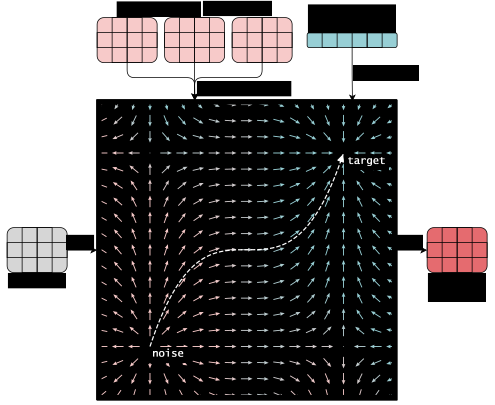
The model segments audio into overlapping atoms (0.22 s segments at 10 Hz control rate), each annotated with a CLAP semantic embedding. A Transformer-based Continuous Normalizing Flow, trained via Flow Matching, learns to predict each atom from its preceding context and conditioning label. At just 36 million parameters, SCAPES can be trained on a single consumer GPU in a duration similar to double the length of the source audio itself.

scapes_architecture

Figure 1. Inference architecture. The Transformer-based vector field is conditioned on past atomic memory via cross-attention and semantic context via AdaLN. An ODE solver integrates the field from noise to target atom.

Try SCAPES

Generate environmental sounds with semantic control and explore smooth interpolations between sound classes directly in your browser using the SCAPES demo.
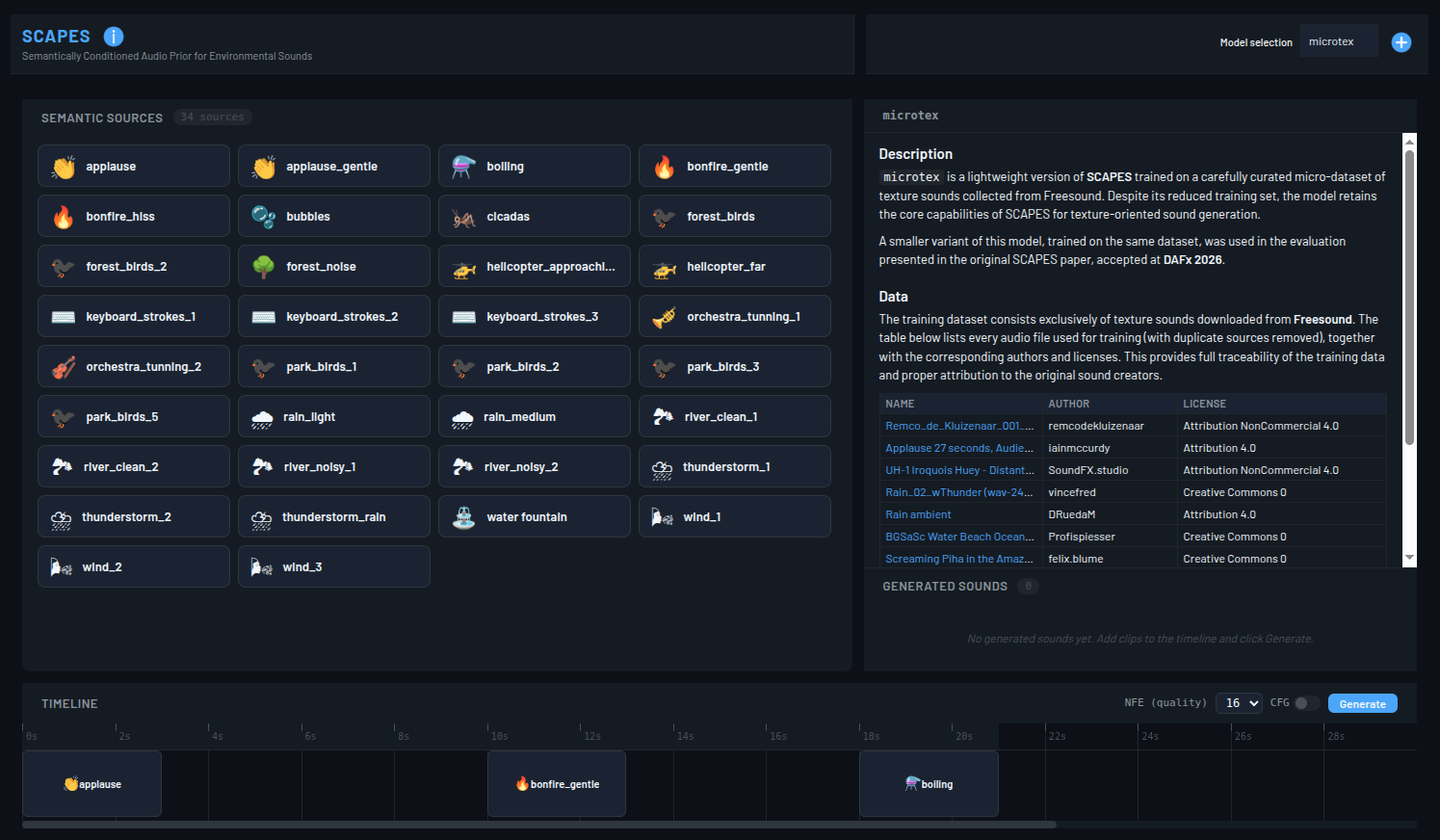
scapes_demo

Figure 2. Interactive demo showcasing the capabilities of SCAPES.

Two models are available: the one used to evaluate the paper, and a second model trained on curated sounds by the artist duo dotzerosix, composed by musicians Tania Cortés and Oscar Bahamonde.

HuggingFace Spaces

Quick Start

SCAPES is fully customizable. You can train your own model and run it in the browser without needing your own hardware. Follow the two steps below to get started.

Step 1: Train SCAPES

Choose one of the two available Colab tutorials:

Simplified Tutorial

Simplified Tutorial

Train with default parameters and generate sounds quickly.

Full Tutorial

Full Tutorial

Dive into the full pipeline: data preparation, custom training, and evaluation.

Step 2: Run SCAPES

Once trained, you can run SCAPES either in the browser or locally on your own machine.

🌐 Running SCAPES in the Browser

Import your trained model into the demo by pressing the "+" symbol and following the instructions.
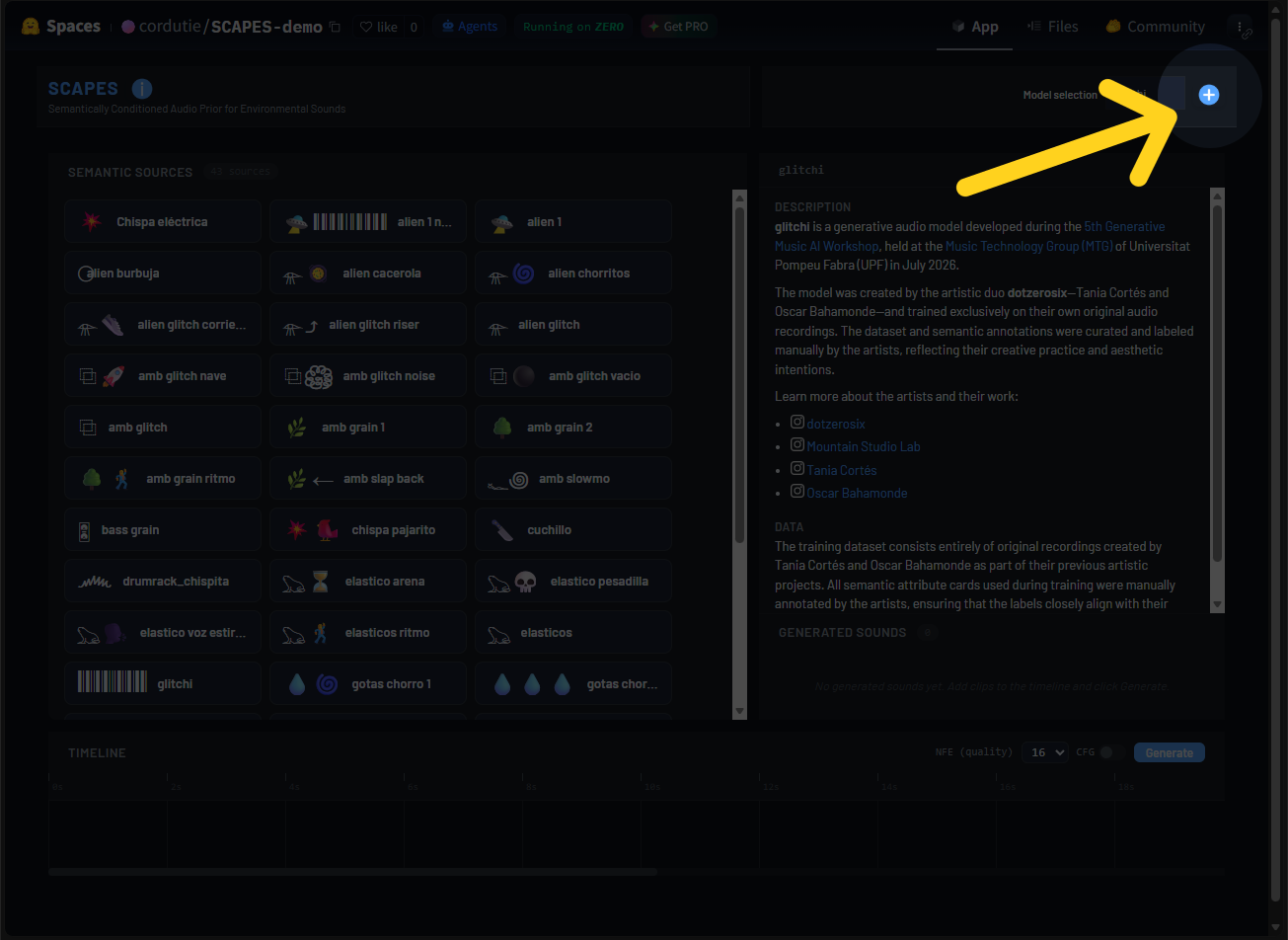
scapes_demo

Figure 3. Model import interface.

💻 Running SCAPES Locally

SCAPES is based on a Transformer encoder that benefits greatly from GPU acceleration. If you have a reasonably powerful consumer GPU, you can run SCAPES locally. For instructions, refer to the README in the source code repository.

Source Code Demo Source Pretrained Models

Contact

If you have any questions, feel free to reach out at esteban.gutierezc@upf.edu.
Acknowledgement

If you use SCAPES, please cite it as (click to copy to clipboard):